Invoicing

    Auto Repair Invoice Software

    Create professional invoices, get paid faster, and manage your entire repair shop from one platform.

    14-day free trial · Credit card required · Cancel anytime

    Most tools do one thing. Repairius does all of them.

    You came for auto repair invoice software. You also get every other tool a modern repair shop needs — for one price.

    Estimates & Invoicing
    Job Management
    Digital Vehicle Inspections
    Customer CRM & Vehicle History
    Inventory & Purchase Orders
    Parts Ordering & Price Compare
    Team & Technician Management
    AI Assistant & AI SEO Suite
    Analytics & Profit Intelligence
    Customer Marketplace & Online Booking
    Reputation Management
    Knowledge Center (DTC codes, torque specs, repair guides)
    Messaging & Team Chat

    Everything included. $49.99/month.

    What is Auto Repair Invoice Software?

    Repairius invoicing lets auto and truck repair shops build itemized invoices with parts, labor, fees, tax, and deposits, then send them by SMS or email for one-tap online payment. Invoices are linked to the customer and vehicle so every visit builds a searchable service history.

    Can I customize my invoice template?
    Yes — add your logo, terms, tax settings, and payment instructions. Every invoice ships with your branding.
    How do customers pay?
    From a link they receive via SMS or email — card or ACH online, or Tap to Pay on iPhone in-shop. You can also mark cash and check payments manually.
    Does it work with QuickBooks?
    Yes — export invoices and payments as CSV for import into QuickBooks, Xero, or any accounting tool.
    See it in the product

    Short clips recorded in a live Repairius account — no mockups.

    Converting an Estimate into an Invoice

    The approved estimate becomes an invoice in one step, with the same line items and totals, ready to send and collect.

    01

    Build an invoice in under 30 seconds

    Start from a job, estimate, or blank invoice. Add parts, labor, and fees from your saved catalog. Deposits are tracked as a separate ledger and automatically deducted from the balance due.

    • Parts + Labor + Fees action buttons pinned to the bottom of the form
    • Save recurring services with your rates and labor times
    • Multi-location tax settings and shop-supply calculations
    02

    Get paid before the customer leaves

    Customers pay from a link — no app to install. Card, ACH, or Tap to Pay on iPhone (native) work out of the box. Cash and check payments can be recorded manually.

    03

    Stop chasing money

    Automated reminders go out on your schedule. Every payment is tied to the invoice, the job, and the customer, so your books stay clean and disputes are easy to resolve.

    See it in action

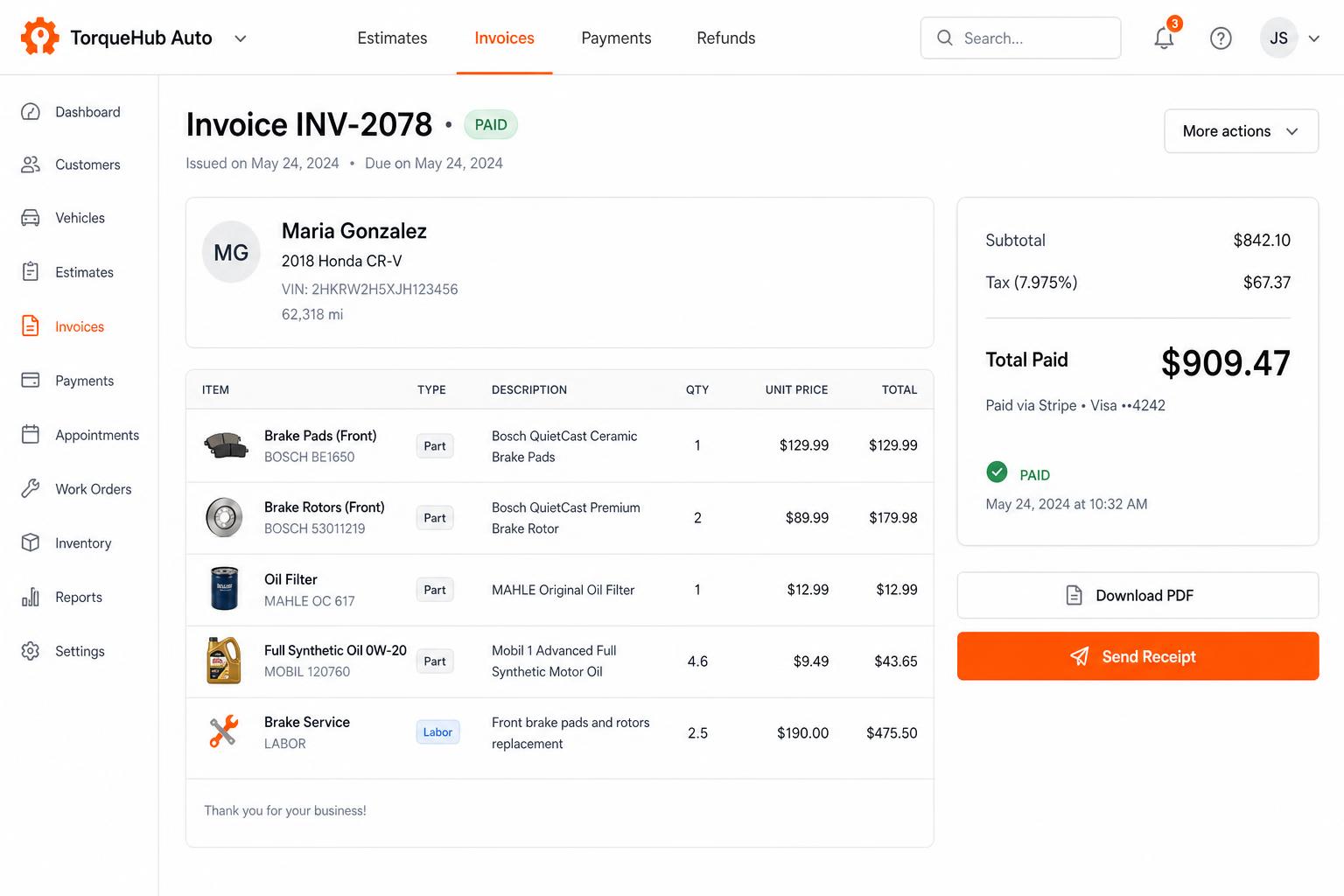
    Repairius Invoices — Stripe payments, PDF export, paid status
    Invoicing + payments, built in
    Convert estimates into invoices, collect card payments via Stripe, send PDF receipts. No third-party billing software.
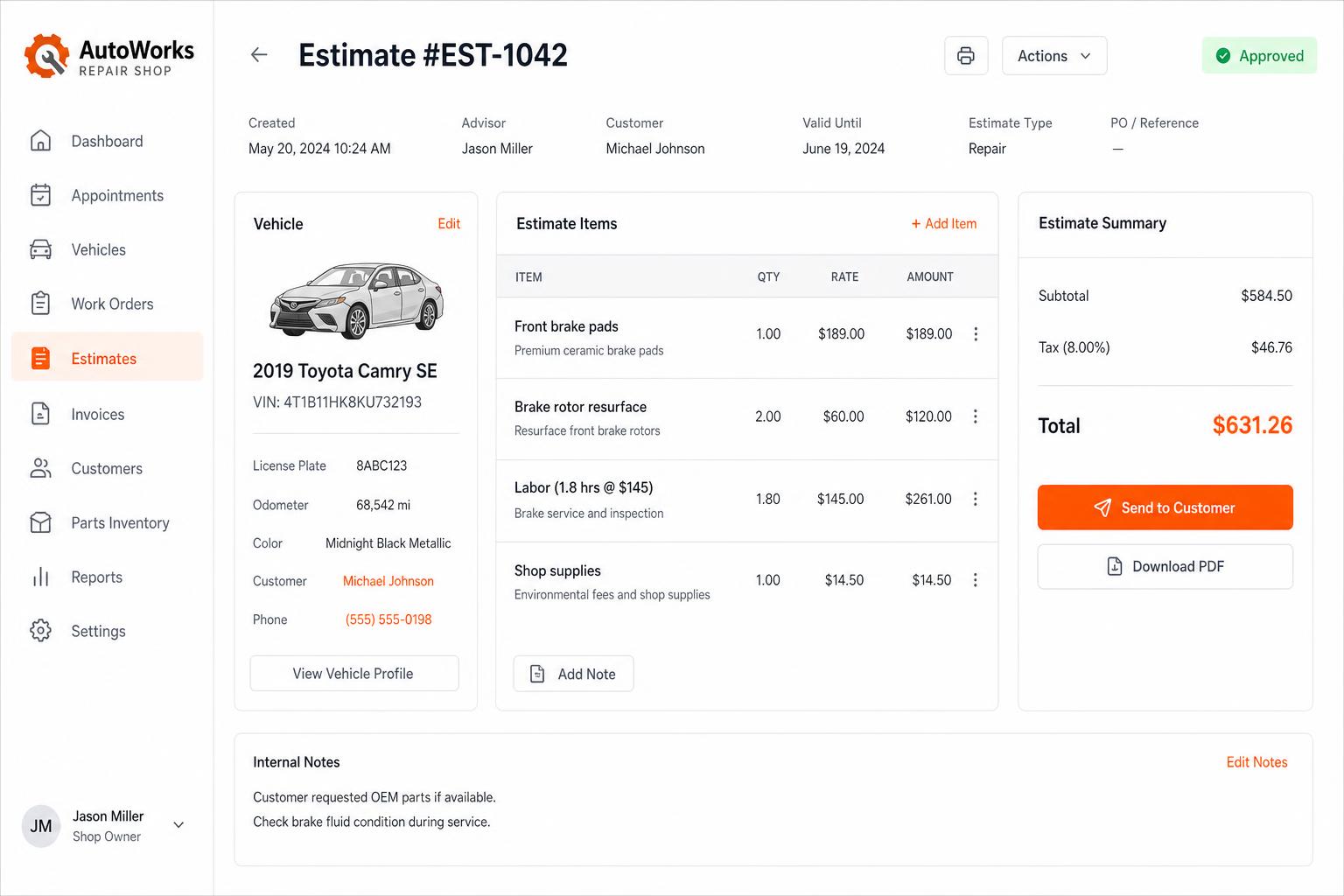
    Repairius Estimates — line items, totals, send-to-customer in one screen
    Estimates that close themselves
    Build line-itemized estimates with parts, labor, tax, and shop supplies. Send via SMS or email — customers approve in one tap.

    Why shops choose Repairius for this

    Get paid 2× faster

    Digital delivery + one-tap payment beats print-and-mail every time.

    No more lost invoices

    Every invoice is stored with the job, vehicle, and customer forever.

    Cleaner books

    Exports for QuickBooks or any accounting tool. Deposits tracked separately.

    Fewer no-pays

    Automated reminders with escalation reduce collections work.

    Instead of stitching together standalone apps

    Standalone apps

    • QuickBooks Invoicing
    • FreshBooks
    • Square Invoices
    • Invoice2Go
    • Multiple bills. Nothing talks to each other.

    Repairius Pro

    • Everything above, plus every other module
    • One customer, one vehicle, one history
    • One monthly bill
    • $49.99/month, all in

    Repairius helps you grow — not just manage

    Unlike traditional shop management software, Repairius lists your shop in a customer-facing marketplace and online booking system. Customers searching for repair services in your area can find and book you directly.

    See the marketplace
    Repairius Pro
    $49.99/mo

    Everything included. Unlimited users. First location.
    Add more locations for $39.99/mo each.

    14-day free trial
    Credit card required
    Cancel anytime
    No hidden fees

    Frequently asked

    Can I customize my invoice template?

    Yes — add your logo, terms, tax settings, and payment instructions. Every invoice ships with your branding.

    How do customers pay?

    From a link they receive via SMS or email — card or ACH online, or Tap to Pay on iPhone in-shop. You can also mark cash and check payments manually.

    Does it work with QuickBooks?

    Yes — export invoices and payments as CSV for import into QuickBooks, Xero, or any accounting tool.

    Can I turn an estimate into an invoice?

    One click — every line item, part, labor, fee, and deposit carries over.

    Get the Repairius App

    Find help, get quotes, and track your service in real time. Download for iPhone today — Android coming soon.

    Download on the
    App Store
    Android
    Coming Soon